
How to repeat header/ repeat specific rows or columns on every printed page. This ways is works in every version of MS Office i.e. Excel of Office 365, Excel for Office 365 in Mac, Excel 2003, 2007 onwards so on.
If you required to print more than one printed page, you can label data by adding row and column headings that will appear on each print page. These labels are also known as print titles.Follow these steps to add Print Tiles to a worksheet:
- On the worksheet that you want to print, in the Page Layout tab, click Print Titles, in the Page Setup group):
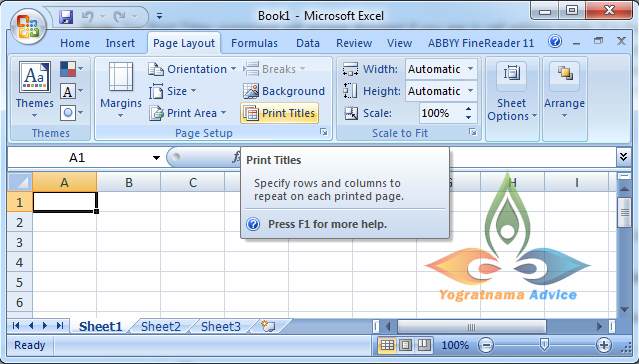
Note: The Print Tiles command will appear dimmed if you are in cell editing mode, if a chart is selected on the same worksheet, or if you do not have a printer installed.
2. In the current dialog box, on the Sheet tab, under Print tiles, do one or both of the following:
- In the Rows to repeat at top box, enter the reference of the rows that contain the column labels.
- In the Columns to repeat at left box, enter the reference of the columns that contain the row labels.
For example, if you want to print first column labels of the current worksheet at the top of every printed page, you could type $1:$1 in the Rows to repeat at top box, which is shown in the snapshot pasted below:
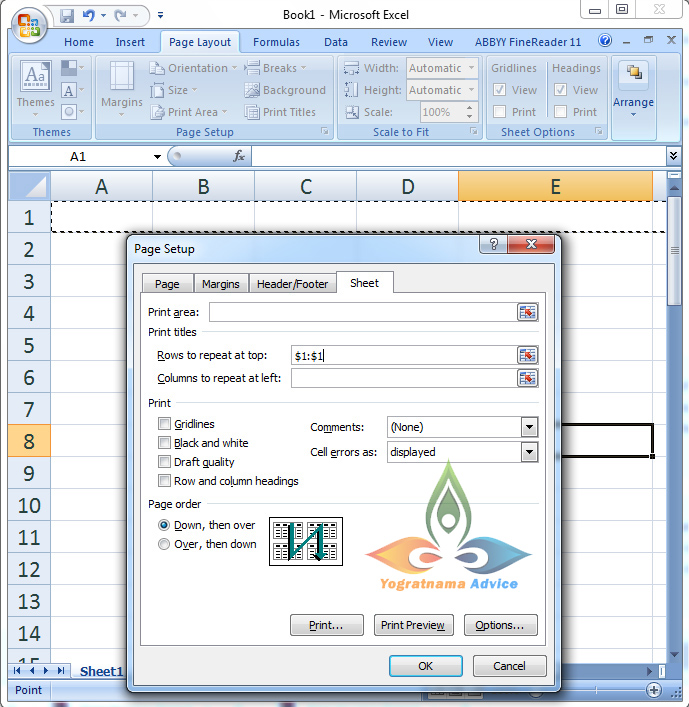
Second Example, if you want to print second column labels of the current worksheet at the top of every printed page, you could type $2:$2 in the Rows to repeat at top box, shown in the aforesaid snapshot. You can change only the number of column label for third Rows i.e. $3:$3, the selected column labels are highlighting by running ant motion, that’s it.
How to repeat header in Excel Smart Trick (Method 2)
Excel Shortcut Keys for Dialogs: You can also open the Print Titles option by pressing the following shortcut key, which is much easier rather than following the aforesaid method given above:
Press Alt+P and thereafter Press I
Dear, readers thanks for reading my article: “How to repeat header in Excel Smart Trick”
 Yogratnama Advice